

Choosing the right Printer Resolution : Dots per Inch (DPI)
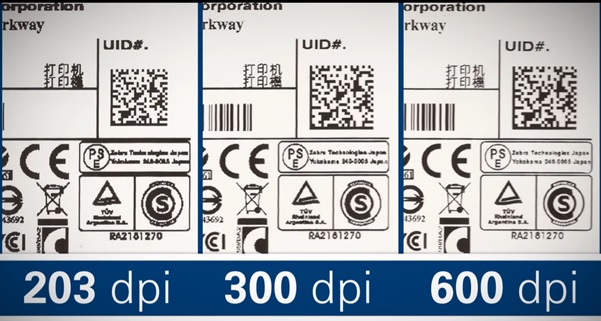
Should you purchase a superior 600dpi printer ‘just in case’? It may not necessarily be the best choice. Determining whether to print on 203, 300 or 600 dpi depends on the following factors that are interrelated.
DPI and Print Clarity
Increasing DPI does substantially increases the number of dots available within a given area. For example, a 600 DPI printhead produces approximately 8.7 times more dots per square area than 203 DPI. This increased dot density is why 600 DPI thermal printing can produce significantly sharper output when printing small text, detailed graphics, high-density barcodes, and other fine feature
DPI and Thermal Printer Speed
One of the main considerations when selecting a thermal printer DPI is print speed. Higher DPI resolutions require more image data and more precise thermal control, which can reduce maximum printing speeds. For example, the Zebra ZT610 can print at speeds of up to 14 ips at 203 and 300 DPI, with lower speeds available at 600 DPI. If high throughput is the primary requirement and the labels do not contain features that require 600 DPI, choosing a lower DPI resolution can help maintain faster print speeds without sacrificing necessary print quality.
DPI and Printhead Cost
DPI also affects thermal printhead cost. A 600 DPI printhead contains twice as many heating elements per inch as a 300 DPI printhead and requires tighter manufacturing tolerances. As a result, 600 DPI printheads typically cost more to purchase and replace. For high-volume printing operations, thermal printhead replacement can represent a significant operating expense. Selecting the right DPI for your application helps ensure that the printer delivers the required level of detail without paying for resolution that the labels do not need.
The Label Format
The best DPI for thermal printing depends on what you are printing. Lower resolutions such as 203 DPI are often suitable for standard labels, while 300 DPI provides greater detail for smaller text, graphics, and barcodes. 600 DPI is best suited to applications requiring extremely fine detail and high-resolution output. Printing text and regulatory symbols for a font size 6 and under requires a 600dpi printer so that the text is readable and the regulatory symbols are identifiable.
Conclusion
When comparing 203, 300, and 600 DPI thermal printers, consider the required print quality alongside printing speed, label content, printhead replacement costs, and overall operating requirements. The highest DPI is not always the best choice—the right DPI is the one that provides the necessary print quality while meeting your operational and cost requirements.
Typical Applications and Print Resolutions
| Resolution | Typical applications | Common label examples | Why use it |
|---|---|---|---|
| 203 dpi | General-purpose labeling | Shipping labels, carton labels, warehouse labels, pallet labels, inventory labels | Lowest cost, fast, sufficient for most normal-sized labels |
| 203 dpi | Retail & logistics | Price labels, shelf labels, dispatch labels, courier labels | Standard text and 1D/2D barcodes print well at normal sizes |
| 203 dpi | Manufacturing | Work-in-process labels, production labels, bin labels | Good for larger labels and standard fonts/barcodes |
| 203 dpi | Healthcare | Patient/asset labels where label size isn’t very small | Adequate for standard text and barcodes |
| 300 dpi | Small-format labels | Small product labels, jewelry labels, electronics labels | Sharper text/barcodes when there is limited physical space |
| 300 dpi | Product identification | Component labels, serial-number labels, small asset labels | Better for small characters and dense information |
| 300 dpi | Healthcare/pharma | Specimen labels, medication labels, small vial labels | Allows more information on a small label |
| 300 dpi | Retail | Small price/product labels, cosmetics labels | Better readability at small print sizes |
| 300 dpi | Manufacturing | PCB/component labels, small-part labels | Good compromise between detail and cost |
| 600 dpi | Very small labels | Semiconductor/component labels, tiny electronic-part labels | Extremely fine text and graphics |
| 600 dpi | Pharmaceutical | Very small vial/ampoule labels, laboratory labels | Useful where small label dimensions require tiny fonts |
| 600 dpi | Jewelry | Small jewelry tags and high-density product identification | Fine text/barcodes in very limited space |
| 600 dpi | Electronics | PCB/component identification, miniature serial-number labels | Handles very small characters and high-density 2D codes |
| 600 dpi | High-resolution graphics | Logos, fine symbols, detailed product/brand labels | Produces much finer curves and |